
Trying to use facebook marketplace without facebook might sound like a paradox, but for dedicated resellers and privacy-conscious bargain hunters, it is standard operating procedure. Whether you want to scan for underpriced inventory without triggering algorithm-based price hikes, dodge annoying social distraction, check local comps from a work computer, or simply keep your flipping strategy private, guest browsing is a powerful habit to build.
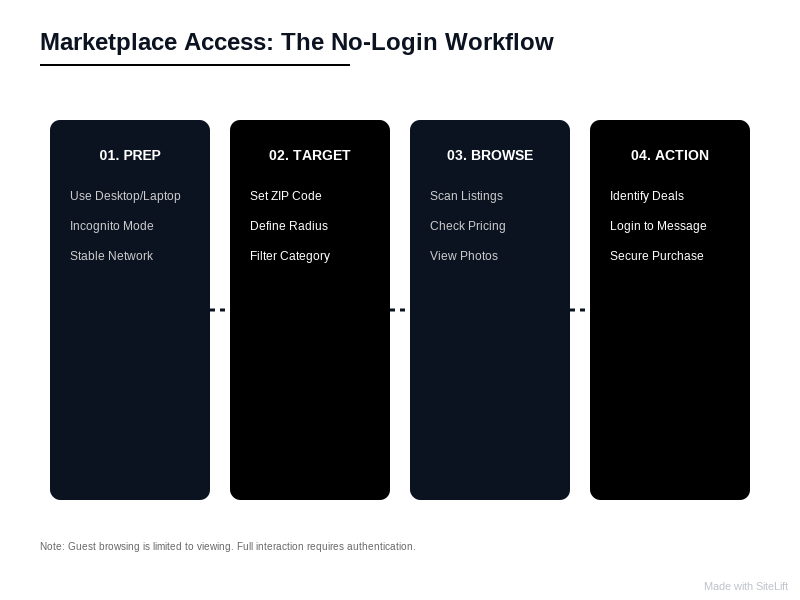
Can you actually browse facebook marketplace without account credentials? The short answer is yes — with clear technical limitations. You can search, view listings, check prices, and inspect local photos anonymously. However, Meta restricts messaging, saving items, and purchasing to authenticated accounts.
In this guide, I will break down the exact 4-step workflow flippers use to navigate Facebook Marketplace without logging in, bypass login loops, and strike when an underpriced deal surfaces.
What You Need
Before jumping into guest browsing, ensure you have the right setup to prevent Facebook’s interface from blocking your access:
- Hardware: Desktop or laptop computer (mobile browsers routinely force app redirects).
- Software: Up-to-date web browser (Chrome, Safari, or Firefox) opened in Incognito or Private mode.
- Network: Stable connection (avoid shared data center VPNs, which trigger instant login popups).
- Location Tool: Local US ZIP code or city target for manual filtering.
- Time Required: 5 to 10 minutes to set up your anonymous search workflow.
Can You Really Use Facebook Marketplace Without Facebook?
Yes, but you need to manage your expectations regarding what guest access allows versus what requires a full profile.
+------------------------------------+------------------------------------+
|  Guest Access (No Login)           |  Logged-In Profile Required        |
+------------------------------------+------------------------------------+
|  Search keyword listings           |  Send direct messages to sellers   |
|  Filter by location, radius & price |  Save listings to favorites        |
|  View photos, descriptions & comps |  Set custom price-drop alerts      |
|  Inspect seller public details     |  Post your own items for sale      |
+------------------------------------+------------------------------------+
What guest access actually lets you do vs. what requires login
When you open facebook marketplace guest access, Meta’s public web server delivers a stripped-down version of the interface. You can set a location radius, search specific keywords like "mid-century credenza" or "iPhone 13," and sort items by price. You can click on individual listings to review description details, photos, and approximate seller locations.
However, the second you click "Send Message," "Save," or try to make an offer, Meta triggers a mandatory login screen.
Why flippers want to browse without an account
For active resellers, staying logged in 24/7 can actually hurt your sourcing speed. According to Statista, Facebook hosts more than 3 billion monthly active users worldwide. Furthermore, data published by Meta indicates that more than 1 in 3 Facebook users in the US buy or sell on Marketplace each month.
Because social commerce competition is intense, serious flippers use guest access to:
- Avoid algorithmic bias: Facebook’s personalization engine tracks your watch history and adjusts search results based on your personal profile rather than pure chronological relevance.
- Prevent deal leakage: Searching from your main account leaves digital tracks that inform Meta’s ad targets and recommended feeds for competitors.
- Screen deals fast: You can open 20 incognito tabs for quick price comp checks without clogging your primary account's notifications.
What Do You Need to Browse Facebook Marketplace Without an Account?
Navigating a marketplace without login prompts requires avoiding the technical friction Meta builds into its web interface.
Best browser setup for marketplace without login
Always use a desktop browser in an Incognito/Private window. Desktop Chrome and Safari give you clean control over cookies and popups. Mobile web browsers on iOS and Android automatically attempt to deep-link you into the Facebook mobile app, which enforces an absolute login wall.
Location, device, and connection checklist
Facebook relies on IP geolocation when you are not logged in. If you are using a VPN set to a server three states away, Marketplace will default to that location every time you refresh. Disable strict VPN routing or set your VPN location to your exact target metro area.

Step 1: How to Open Facebook Marketplace Without Logging In Using a Direct Link
The most direct way to start browsing without credentials is by navigating to Meta's public commercial directory landing page.
How to use the facebook.com/marketplace guest entry point
- Open a fresh Incognito or Private window in your desktop browser.
- Type the direct URL:
https://www.facebook.com/marketplace/into your address bar and press Enter. - When the page loads, Meta will often display a banner or modal asking you to log in or create an account. Click the small "X" in the top corner of the overlay or tap anywhere on the dark background outside the box to clear it.
How to change location and browse categories without an account
Once the popup is cleared, look at the left sidebar or top filter bar:
- Click on the Location selector (it usually defaults to your nearest major city based on IP).
- Enter your desired ZIP code or city name, and adjust the radius slider (e.g., 20 miles).
- Hit Apply. The public grid will refresh with active local inventory.
Pro Tip: Bookmark location-specific category links. For example, bookmarking https://www.facebook.com/marketplace/sanfrancisco/furniture allows you to jump straight into a localized category screen in one click, bypassing initial landing page prompts.
Step 2: How to Search Marketplace Anonymously With Google Search Tricks
Relying solely on Facebook’s internal search bar while logged out can trigger login popups after 3 to 5 queries. You can bypass this completely by leveraging Google search operators to search marketplace anonymously.
Using site search to find listings Google has indexed
Google continuously crawls public Facebook Marketplace links. By restricting your Google query to the Marketplace subfolder, you extract clean results without touching Facebook’s scripts until you choose to click a link.
Use this search formula in Google:
site:facebook.com/marketplace "KEYWORD" "CITY"
How to filter by price, brand, and city anonymously
Here are copy-paste search dorks ready for your daily deal-sourcing routine:
- Furniture comp search:
site:facebook.com/marketplace "Herman Miller" "Dallas" - Budget vintage search:
site:facebook.com/marketplace "vintage dresser" "under $100" "Austin" - Power tool search:
site:facebook.com/marketplace "Milwaukee fuel" "Chicago"
| Search Operator Strategy | Target Item Example | Flipping Objective |
|---|---|---|
site:facebook.com/marketplace [item] [city] |
site:facebook.com/marketplace "Eames chair" "Seattle" |
Surface unindexed high-end furniture |
site:facebook.com/marketplace [brand] [price] |
site:facebook.com/marketplace "DeWalt" "$50" |
Find quick cash-and-carry tool flips |
site:facebook.com/marketplace [niche] [zip] |
site:facebook.com/marketplace "cast iron" "30301" |
Screen estate sale drops locally |
Note: The main limitation of Google site search is speed. Google indexes pages periodically, meaning you might find an incredible deal that was posted three days ago and has already sold. For real-time speed, combining direct browsing with dedicated aggregators yields better results.
Infographic by SiteLift
Step 3: How to Browse Facebook Marketplace Without Account Using Third-Party Viewers and Aggregators
If manual Google dorks and tab clearing feel too slow, experienced resellers rely on specialized tools designed to crawl local classified listings.
What are Facebook Marketplace viewer tools and how do they work?
Third-party market view tools crawl open-web data from Facebook, Craigslist, and OfferUp to display public listings inside a single dashboard. By using a Facebook Marketplace viewer, you can bypass account walls entirely during your initial discovery phase.
How to compare prices and track deals smarter as a guest
According to Pew Research Center, roughly 68% of US adults use Facebook, making it the highest-volume local market in most territories. However, flipping items for maximum profit requires cross-platform validation.
When you use a cross-platform aggregator, your workflow changes:
- Scan live public feeds across Facebook, Craigslist, and OfferUp simultaneously without logging into any of them.
- Check sold comp data on secondary markets like eBay or Poshmark.
- Identify items priced 50% or more below market value.
- Only launch a logged-in account when you have confirmed a high-margin opportunity.
Step 4: How Do Flippers Act on a Deal When You Cannot Message the Seller?
Spotting a profitable flip without an account is only half the battle. Because Meta strictly forbids guest communication, you must have an execution plan once you locate a winner.
Your options to contact a seller without a full Facebook profile
- The Secondary "Buyer Only" Account: Maintain a lean, locked-down secondary Facebook profile on your phone or secondary browser tab. Keep this account logged in separately so you can quickly paste the URL of the listing you discovered as a guest and hit "Send Message" immediately.
- Network Messaging: Send the public listing URL to a partner, spouse, or team member who is already logged in, allowing them to initiate contact on your behalf.
- Check for Public Phone Numbers: Sellers frequently list their phone numbers, email addresses, or Instagram handles inside item descriptions—especially for auto sales, estate clears, or real estate asset liquidations.
How to decide when it is worth creating a minimal buyer account
According to ThredUp's Resale Report, the global secondhand market is projected to reach $350 billion by 2028. With that volume of inventory circulating, spending 30 seconds logging in to secure a $200 margin flip is well worth the minor friction. If you want to streamline your search tactics across platforms, learning how to browse marketplace like a pro ensures you act before competitors close the deal.
Why Is Facebook Marketplace Asking for Login? Troubleshooting and Common Pitfalls
If you hit a sudden wall where every page refresh forces a full-screen login box, Meta's automated rate-limiting has flagged your guest session.
How to bypass the login popup loop and location reset
- Clear Cookies and Site Data: Open your browser settings, clear cookies specifically for
facebook.com, and restart your private window. - Switch Browser Agents: Toggle your desktop browser to "Desktop Mode" if you are on a tablet, or switch from Chrome to Safari/Firefox.
- Disable Aggressive Ad-Blockers: Highly strict script blockers occasionally break Facebook’s public script execution, triggering defensive authentication popups.
What to do when listings will not load or images are blurred
When Meta detects heavy guest traffic from an IP address, it may intentionally render listing images at low resolution or block description text.
- Fix: Copy the URL of the broken listing and paste it into Google’s search bar, then click the down arrow next to the result URL to view the Google Cached version or switch to an alternate internet connection (like a mobile hotspot).
What Is the Smartest Way for Flippers to Use Marketplace Guest Access Long-Term?
Guest access is an intelligence-gathering tool, not a full replacement for buying infrastructure.
+-------------------------------------------------------------------------+
|                  THE ANONYMOUS FLIPPER SOP SYSTEM                       |
+-------------------------------------------------------------------------+
|  1. DAILY SCAN (Anonymous / Guest Access)                               |
|     - Run clean, unbiased keyword searches without account tracking.    |
|     - Use direct category links & site search dorks.                     |
+-------------------------------------------------------------------------+
|  2. MARGIN EVALUATION (Off-Platform)                                    |
|     - Compare asking prices against sold comps on eBay / Poshmark.      |
|     - Select only deals offering 3x+ ROI or $100+ net profit.           |
+-------------------------------------------------------------------------+
|  3. EXECUTION (Logged-In Profile)                                       |
|     - Open targeted listing in designated buyer profile tab.            |
|     - Send tailored, fast message: "Cash ready, can pick up today."     |
+-------------------------------------------------------------------------+
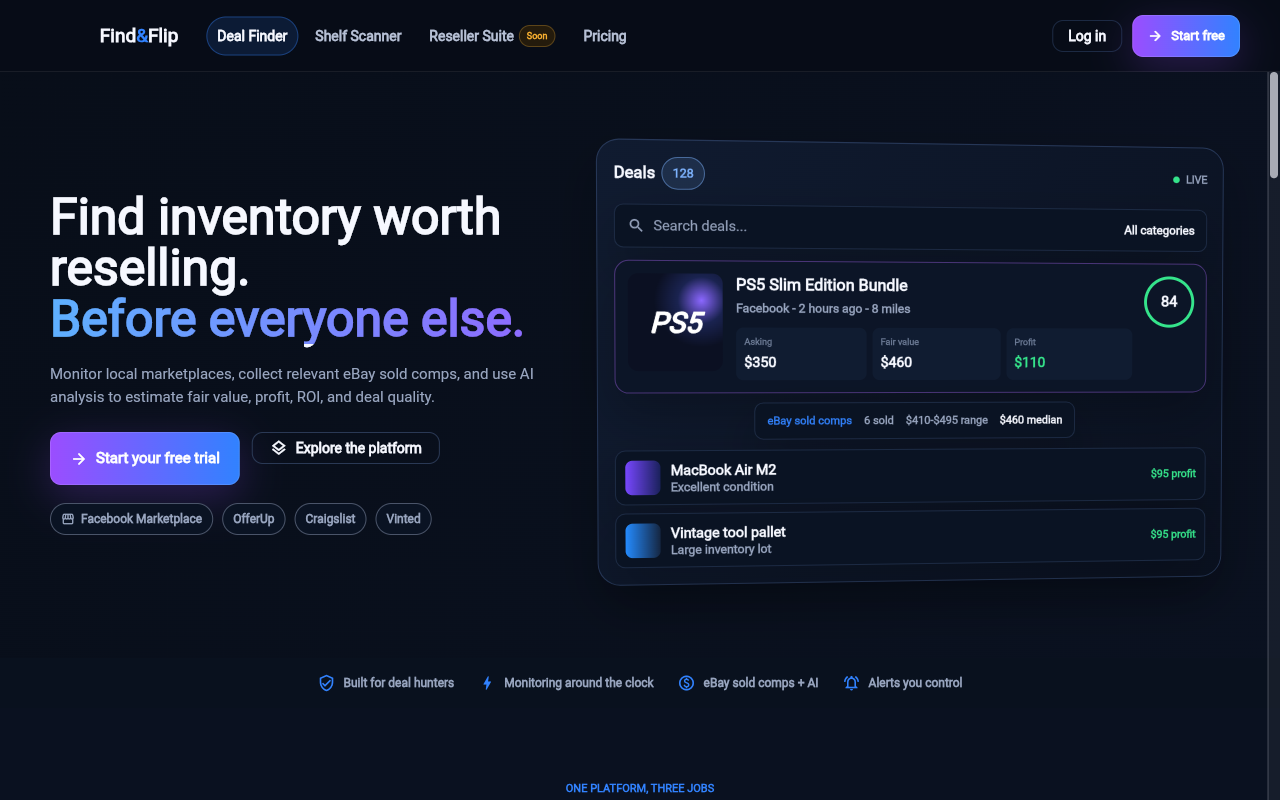
Instead of spending hours getting locked out of manual search sessions, smart flippers automate their deal pipeline. Tools like findandflip.io continuously aggregate underpriced listings across Facebook Marketplace, Craigslist, OfferUp, and Vinted. This allows you to spot mispriced inventory automatically without endlessly refreshing login-walled websites.
FAQs About Using Facebook Marketplace Without Facebook
Can you browse Facebook Marketplace without a Facebook account?
Yes. You can visit facebook.com/marketplace in a desktop web browser to view public listings, change search radii, and inspect item details. However, you cannot message sellers, save listings, or complete transactions without an account.
Can you message a seller or buy on Facebook Marketplace without logging in?
No. Meta strictly requires an active, authenticated Facebook account to send messages, negotiate prices, or complete shipping checkouts. Guest access is view-only. Refer to the Facebook Help Center for official communication policies.
Why does Facebook Marketplace keep asking me to log in after a few clicks?
Facebook uses rate-limiting to prevent automated scraping. If you click multiple listings rapidly while logged out, Meta throws a mandatory login modal. Clearing your cookies or opening a fresh Incognito tab resets the counter.
How can I search Facebook Marketplace by location and price without an account?
Navigate to facebook.com/marketplace on a desktop browser, dismiss the initial login popup, and use the left-hand navigation menu to set your target ZIP code, mile radius, minimum price, and maximum price filters.
Are third-party Facebook Marketplace viewers safe to use without Facebook?
Legitimate deal aggregators and search viewers that collect open public data are safe to use for deal discovery. However, never enter your personal Facebook account credentials into any unofficial third-party application or website.
— findandflip.io